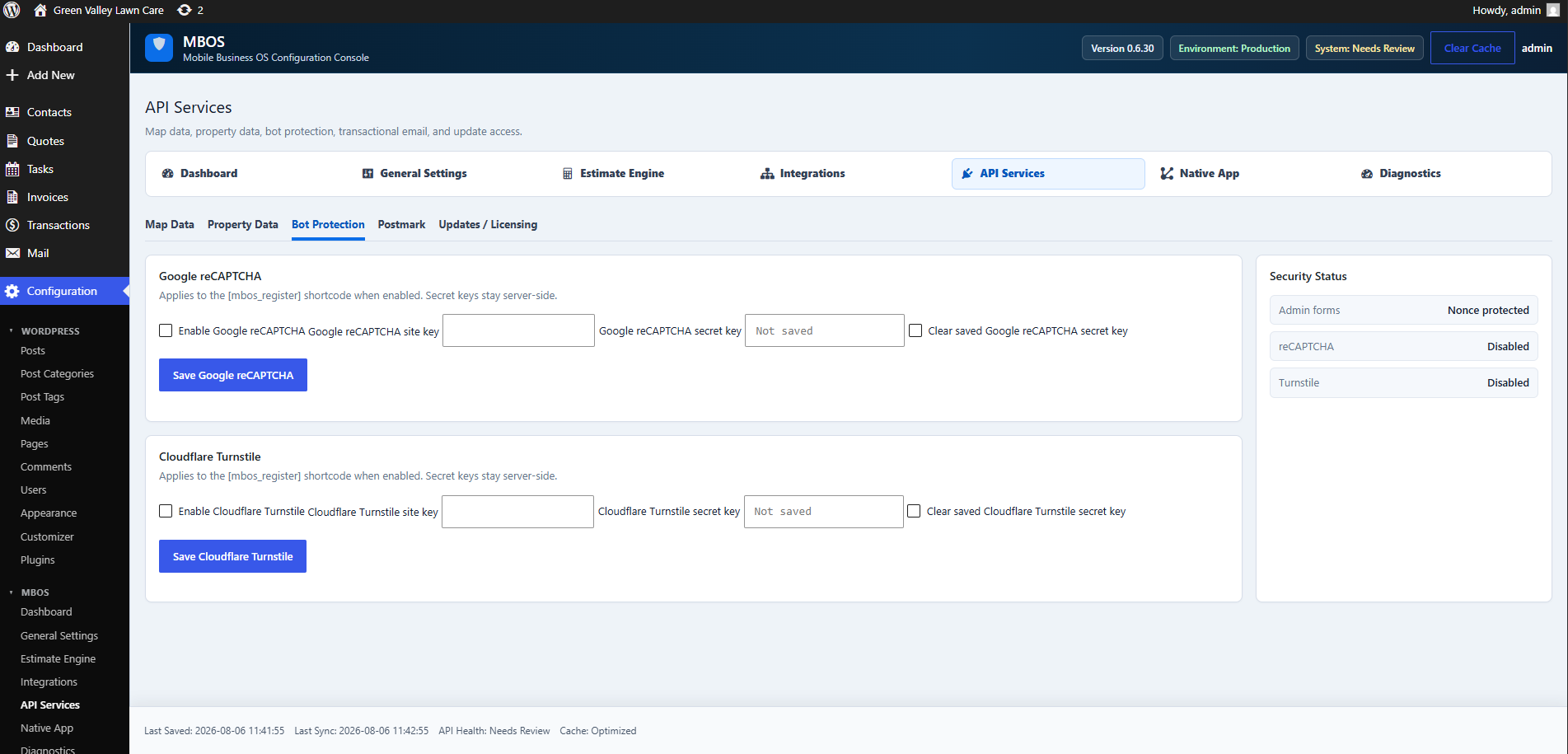
Chapter 6.8 Verified · Installation & Setup Protects forms using the MBOS registration shortcode from automated submissions. Navigate: MBOS → API Services → Bot Protection Figure 6.8 · Screenshot captured from the verified demonstration installation. Sample business information is illustrative. What does this control? Protects forms using the MBOS registration shortcode from automated submissions. How…
Published
Chapter 6.8
Verified · Installation & Setup
Protects forms using the MBOS registration shortcode from automated submissions.
Navigate: MBOS → API Services → Bot Protection
Figure 6.8 · Screenshot captured from the verified demonstration installation. Sample business information is illustrative.
What does this control?
Protects forms using the MBOS registration shortcode from automated submissions.
How do I configure it?
Enable Google reCAPTCHA.
Enter the Site Key.
Enter the Secret Key.
Click Save Google reCAPTCHA.
Why is this useful?
Reduces spam registrations and automated abuse.
How do I verify it?
Confirm Security Status shows reCAPTCHA enabled.
Test a legitimate registration.
Still need help?
If this article didn’t solve the problem, send WNYpress the details and we’ll help you with the next step.