Chapter 6.5
Synchronize Bookly appointments with Jetpack CRM
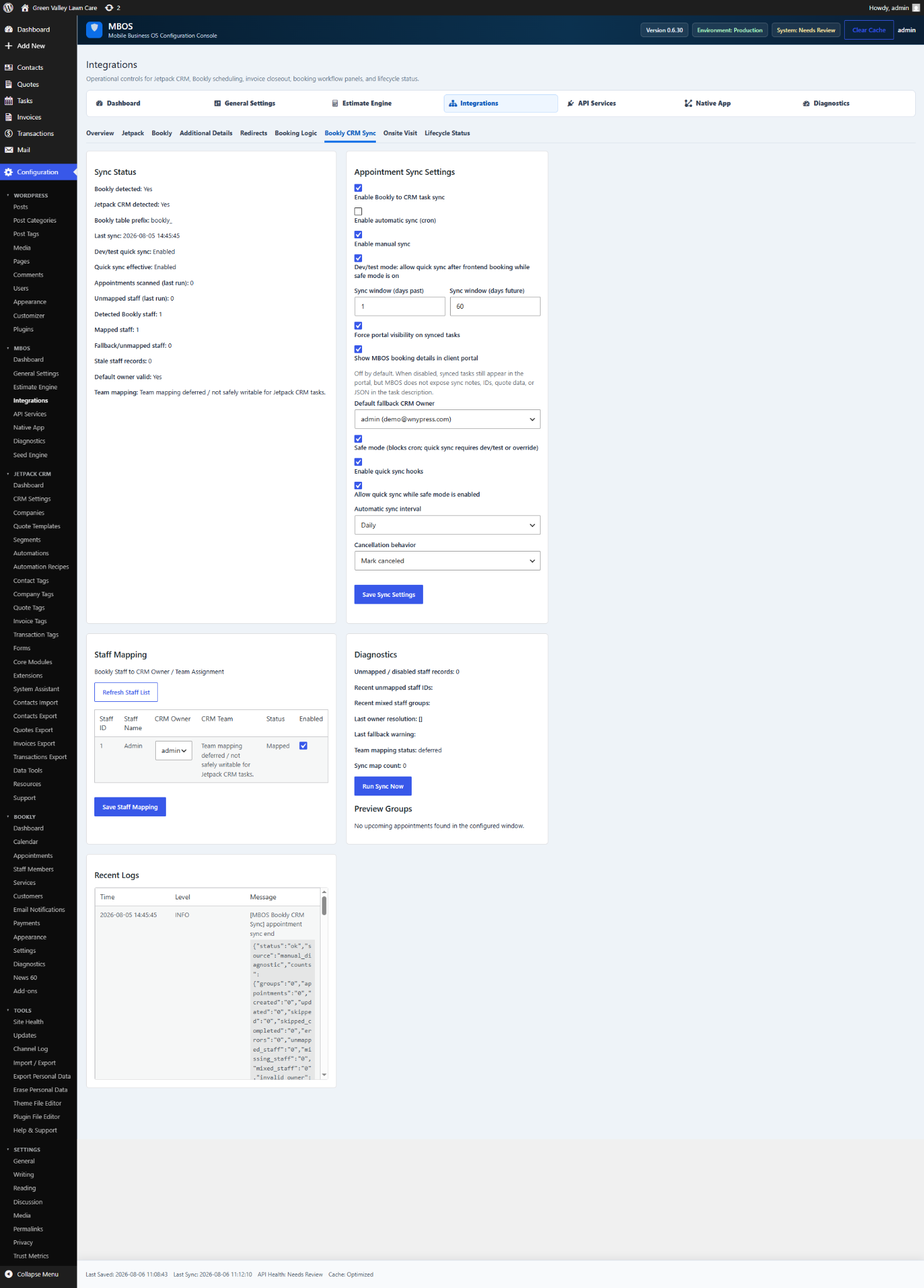
Creates or updates Jetpack CRM tasks from Bookly appointments.
Navigate: MBOS → Integrations → Bookly CRM Sync
What does this control?
Creates or updates Jetpack CRM tasks from Bookly appointments.
How do I configure it?
- Enable Bookly to CRM task sync.
- Enable automatic sync (cron).
- Save Sync Settings.
- Refresh Staff List.
- Map each Bookly staff member to the appropriate CRM Owner.
- Save Staff Mapping.
- Run Sync Now.
Why is this useful?
Keeps scheduling activity visible inside the CRM and assigns tasks to the correct owner.
How do I verify it?
- Confirm unmapped staff is zero.
- Review Sync Status and Recent Logs.
- Create a future Bookly appointment and confirm a CRM task appears.